1. ペンツールの概要
本ガイド(Perplexity)では、iPad版Affinity Designer 2のペンツールを使いこなすための基本操作から応用テクニックまでを解説します。
1.1 ペンツールの選択と設定
iPad版では、左側ツールパネルから「ペン」アイコンをタップして選択します。
設定項目
機能説明
モード
ペン/スマート/ポリゴン/線 の4種類(後節参照)
ラバーバンドプレビュー
次に配置されるセグメントのプレビュー表示
カラー
境界線の色を変更(右側カラーと連動)
塗りつぶしを使用
ONで閉じたシェイプ内部、または凹領域を自動塗りつぶし
選択範囲を保持
ONで描画中も先に描いたカーブのノードを保持
カーブに追加
ONで同一レイヤーに追加描画(OFFだと新レイヤー作成)
1.2 モード別特徴と使い分け
コンテキストツールバー上部のモードアイコンで切り替えます[1]。
モード
特徴
ペン
カーブ・コーナーを自由に操作できる最も汎用的なモード
スマート
ノードをタップするだけで自動的に流れるような滑らかカーブを作成
ポリゴン
ハンドルなしのシャープエッジのみを描画
線
クリック/ドラッグで単一直線を連続描画
1.3 ベジェ曲線の描画手順
開始点を配置 セグメントを引く 閉じる/続ける
1.4 ノードとハンドルの編集
ノード追加 :ノードツールで線上をタップ。ノード削除 :ノードを選択後、コンテキストツールバーのゴミ箱アイコンをタップ[1]。ハンドル操作 :ペンを放したままドラッグで表示。Control押し:ハンドルを直線に変更
Option押し:片側ハンドルのみ移動可
ノードタイプ切替 :コンテキストツールバーでコーナー⇄スムーズを切り替え
1.5 アクション機能
結合 :2本のカーブを選択→「結合」で1つのシェイプに[1]カーブに追加 :ONで同一レイヤーに追描画(OFFは別レイヤー)選択範囲を保持 :ONで描画中も既存カーブのノードをスナップ保持
1.6 操作を終了する方法
コンテキストツールバーの「×」をタップ
ツールを「移動」や「ノード」に切り替える
このように、iPad版Affinity Designer 2のペンツールは多彩なモードとコンテキストアクションで、デスクトップ同等の精密なベジェ編集を実現します。Apple Pencilと組み合わせて、自由自在に曲線やシェイプを描画してください。[2][1]
情報源
[1] Affinity Designer 2 iPad版【ペン】ツールの使い方 – ties tokyo https://ties.tokyo/how-to-use-the-pen-tool/ https://www.youtube.com/watch?v=GZ4gRvj9jd8 https://ties.tokyo/how-to-use-a-pencil-tool/ https://www.youtube.com/watch?v=ba8KO1ozI-0 https://www.youtube.com/watch?v=zSEYK2ezzg4 https://www.youtube.com/watch?v=aXQxpTha5Wo https://www.lucas-note.blog/draw_01/ https://www.youtube.com/watch?v=rhT_Tu9tyCQ https://note.com/horitake/n/n05459028a4e9 https://www.youtube.com/watch?v=XtvVEv5udVA https://affinity.serif.com/en-gb/learn/designer/ipad/quickstart/ https://www.youtube.com/watch?v=ZcABqGqo098 https://www.youtube.com/watch?v=fdn5FaMM6bk https://affinity.serif.com/ja-jp/learn/designer/ipad/quickstart/ https://chomi15.com/pc-affinity/006/ https://forum.affinity.serif.com/index.php?%2Ftopic%2F202045-pen-tool-help%2F
以上,2025年7月4日。
2. ペンツール > スマートモードでの作業
2.1 準備
図3左のツールのペンツールを選択して,上段でスマートモードを表示して,小宝島の地形分類のために,段丘が示す旧汀線を描き始めた。
琉球列島,宝島・小宝島の第四期後期離水サンゴ礁と完新世後期の海水準 のFig. 5には,小宝島の地形分類図を示しているが,これは米軍が1946年ごろに撮影した空中写真を国土地理院から購入(中田さんが?)して,それを撮影して,教室の暗室でネガをズームインして,鉛筆でなぞって作成したように思う。今回の作業は,1万分の1(CKU783-C18-2, -3)を使用している。
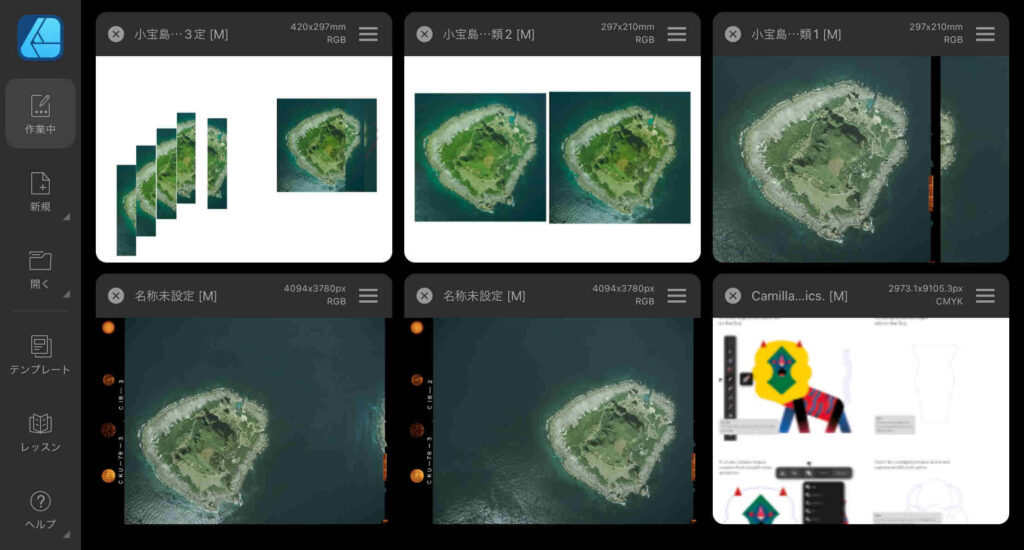
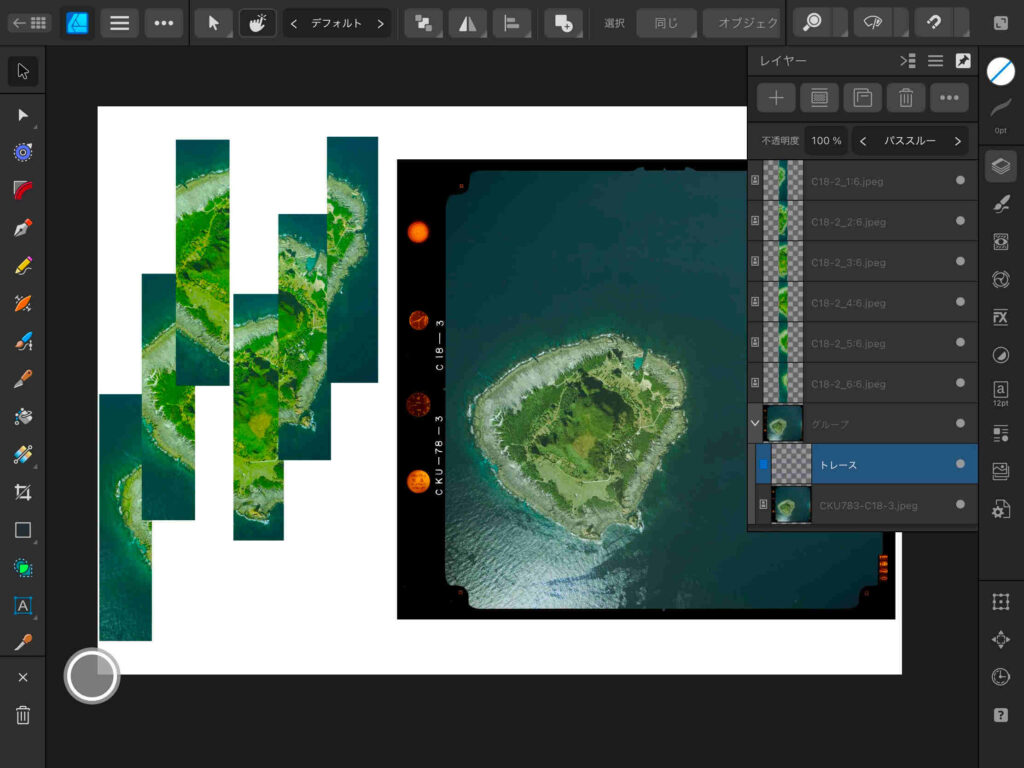
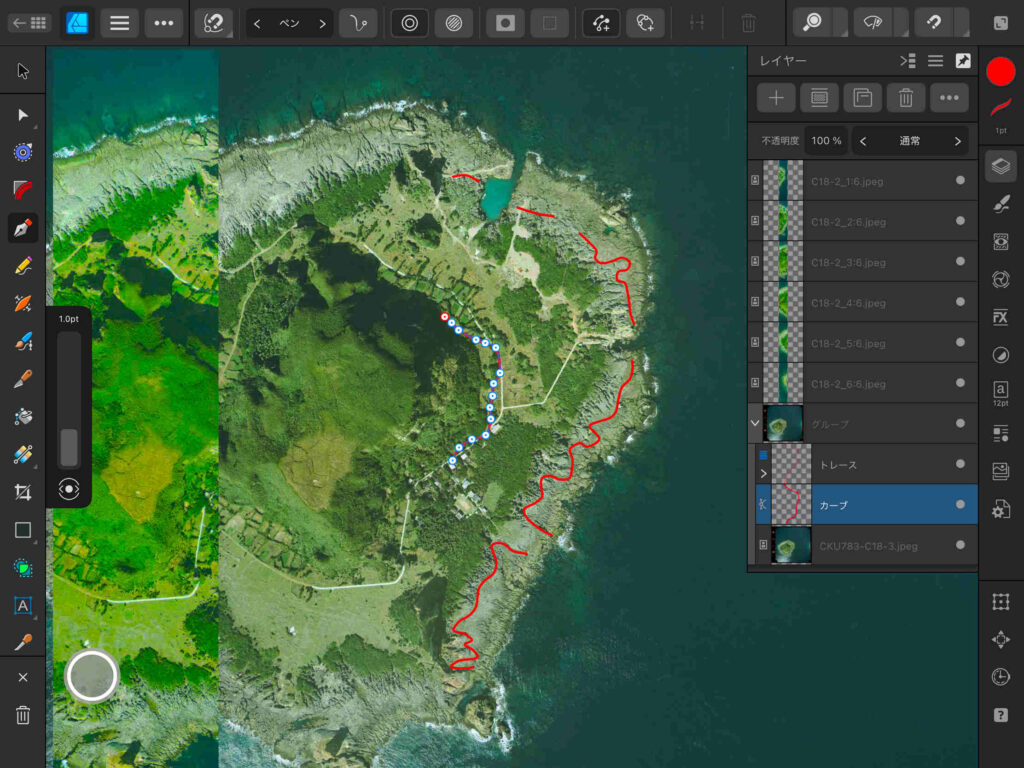
図1の上段左端の画像が現在作業しているファイルである。下段左端がCKU783-C18-3,下段中央がCKU783-C18-2である。iPad上での実体視の作業のために,島の周囲を切り取ったのが上段中央である。
上段左端は,iPadPro with Apple Pencil + Affinityでの作業を実行しやすくするために作成したファイルである。このファイルの右側の島全部が見える写真はCKU783-C18-3で,左側の5枚(6/6〜2/6)はCKU783-C18-2をGIMPで切り取ったものである。範囲がダブル形で切り取っている。全部で6枚からなり,残りの1枚(1/6)は,CKU783-C18-3の上に載せている。
図1 iPadProのAffinity Designer 2 のトップページ(作業中) 2.2 線引き作業でのベクトル群と写真のずれ
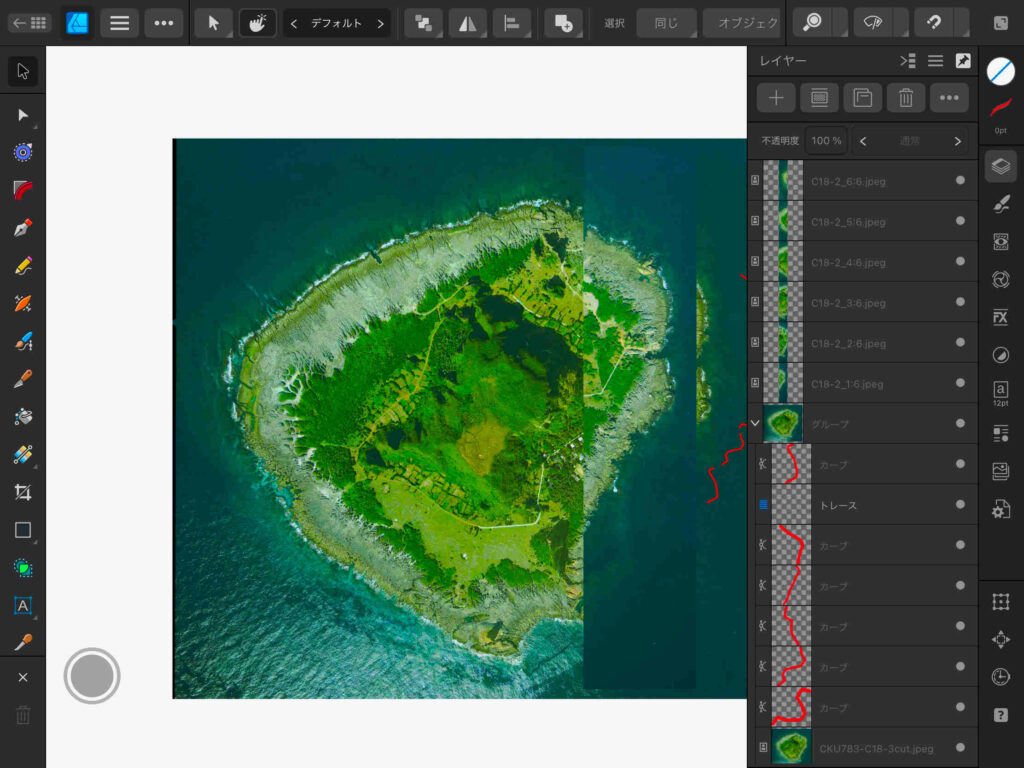
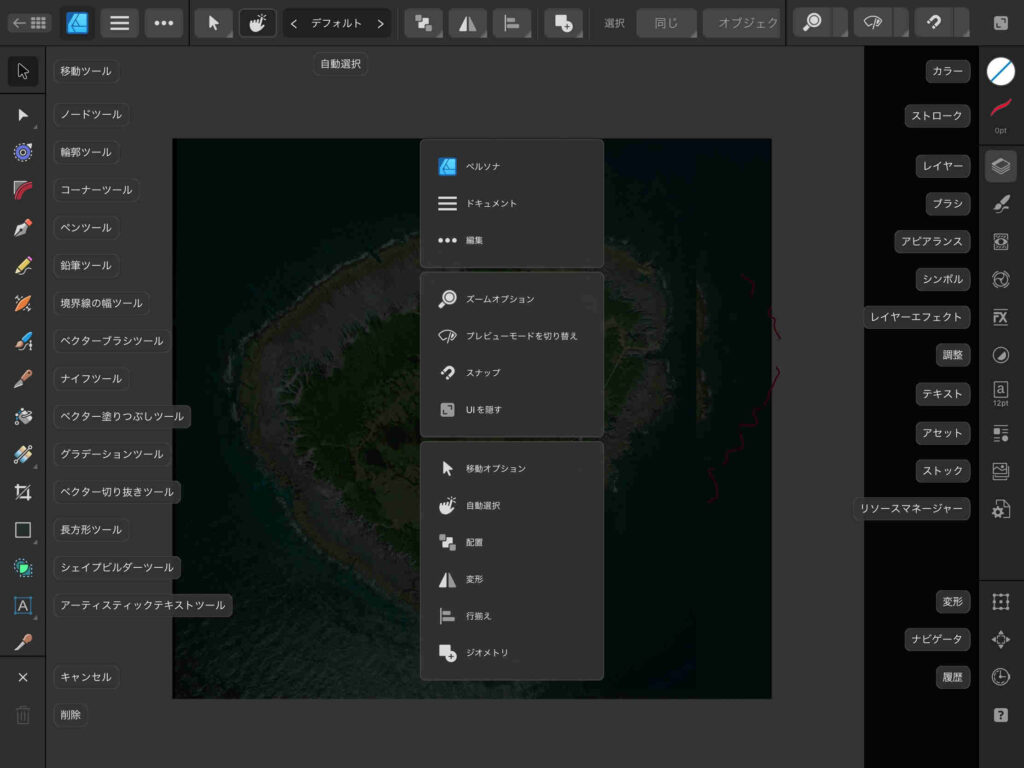
図2では,右端のツール群の「レイヤー」を表示している。図3は右端のツール群最下端の「?」ボタンを押して,ツールの機能を表示したところである。
図2 線引き作業中の
図3 ツールの機能表示
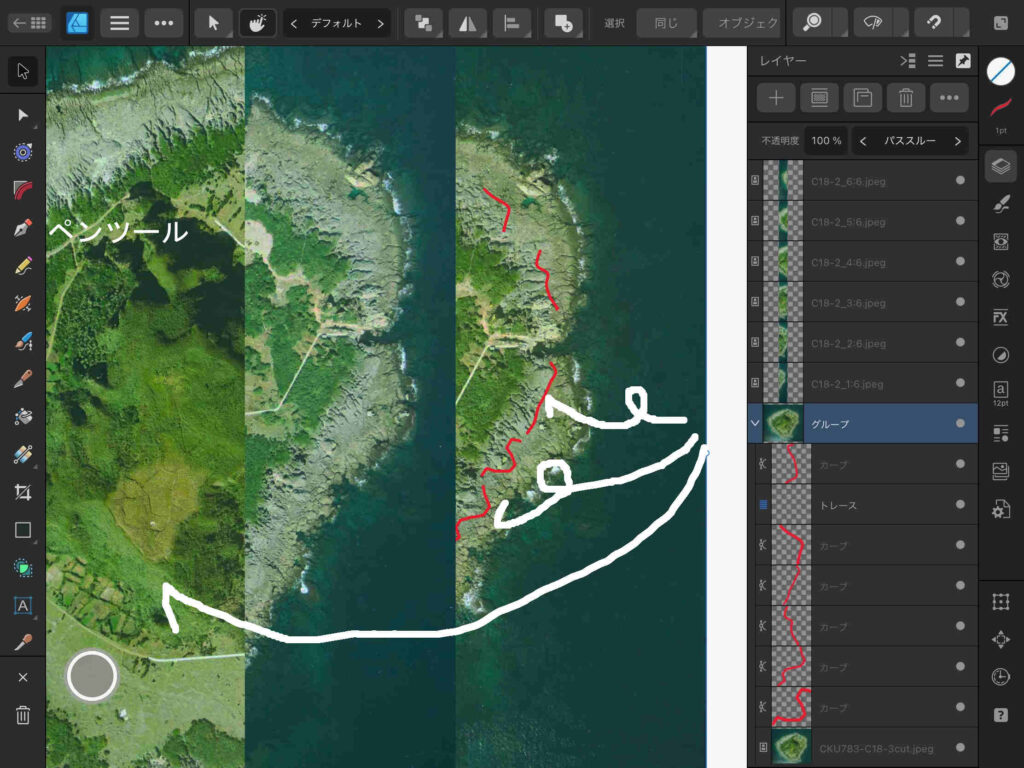
図2の作業画面を見ると,赤いベクトル線が空中写真上で作業した位置からずれている。これはぼくが空中写真を二本指でドラッグした結果なのであるが,グループ化している筈であったが,保存したあと,この作業画面に戻って,作業しようとするとこのような結果になったのである。なお,図2のレイヤー表示を参照願いたい。
mac上のAdobe Illustratorで作業する場合,このようなことは決して生じたことがない。さて,この原因は何か,今のところ,全くわからないのである。このトラブルに遭遇したので,この投稿作成を考えた。また迂回路の始まりである。
以上,2025年7月6日。
2.3 ずれを防止する方法の鍵を発見?
試行錯誤して,上記問題をクリアすることができた。
macではAdobe Illustratorを使ってきた。画像を下敷きにして何らかの作業を上のレイヤーで実行して,表示を拡大縮小しても,画像と上のレイヤーで作業したベクトルコンテンツはずれることは決してない。ところが,Affinity Designer 2の操作中に,画像を拡大縮小したり移動したりすると,ベクトルレイヤー上のコンテンツが取り残されることが多々ある。これでは落ち着いて画像の読み取りができない。
ネット上のコンテンツを調べたが,みつからなかった。
そして,この現象を抑える方法がわかったので,ここに示す。
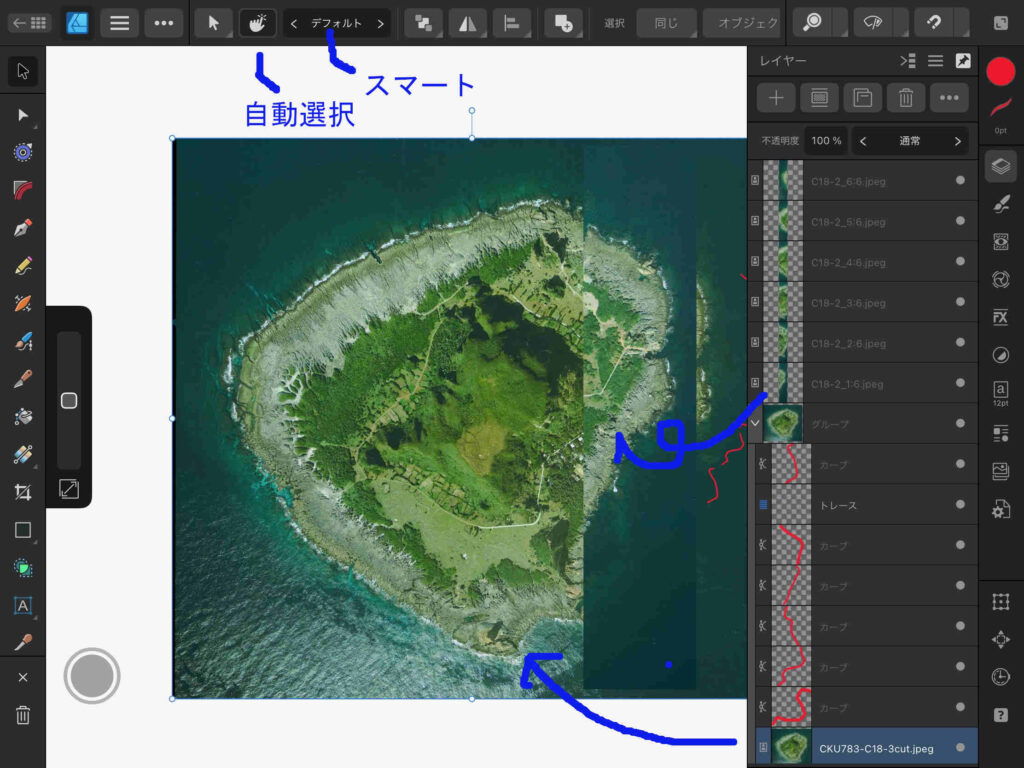
図4 下図(右手の空中写真)を選ぶと
図5 左手の空中写真の分割スリップを選ぶと
図6 グループ化されたコンテンツ
図4中の右側には,レイヤーアイコンが押されたままで,このファイルのレイヤー構造が見える。図3にはアイコンの説明が見えるが,右端のツール群の上から3番目がレイヤーアイコンである。
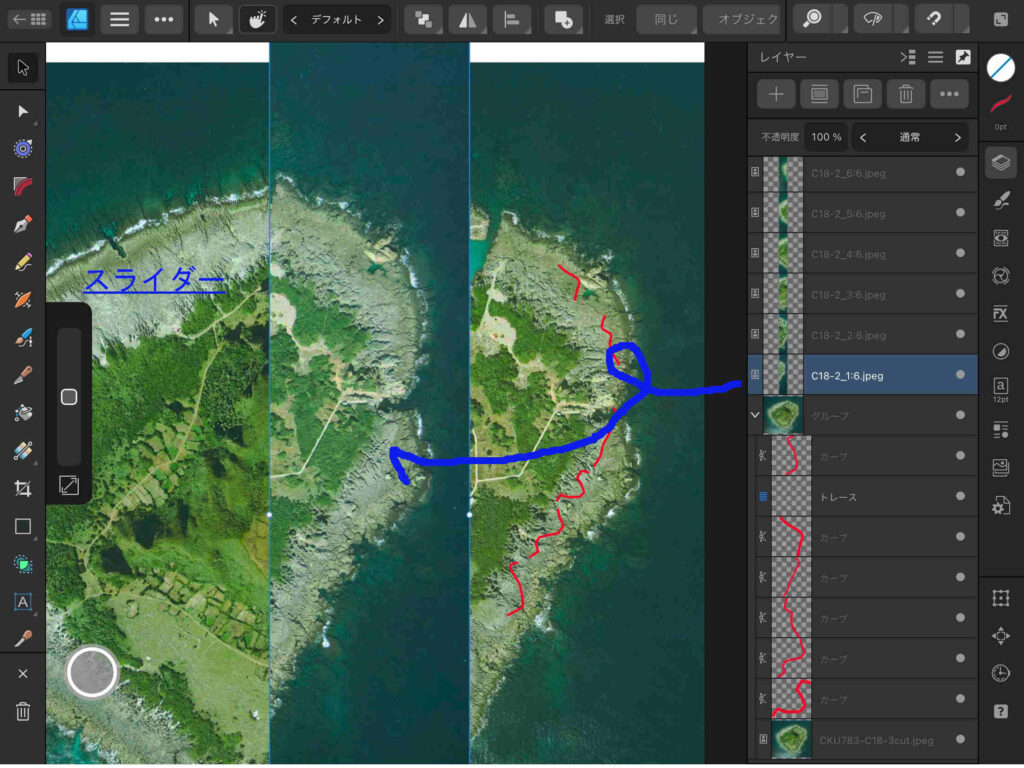
そして,図4中右側に表示されているレイヤー群の最下段の,空中写真CKU783-C18-3cutが選択されている。これに対応して,左端のアイコン群右手に縦長のスライダーが表示されている(図5にスライダーと表示している)。このスライダー中の◻︎を上下に動かすと,空中写真CKU783-C18-3cutだけが拡大したり縮小したりするのである。
レイヤー群のほぼ中央に小宝島の写真が見え,この右手に文字「グループ」が見える。レイヤー群の様子から,この中央の小宝島の写真アイコンより下の赤い線分からなるサブレイヤーとレイヤー群最下端の小宝島の写真は一つのグループからなっていることがわかる。
レイヤー群のすぐ上には5個のアイコンが並んでおり,図6ではその中央のフォルダーようなアイコンをタップすると「グループ解除」などの見出しが並ぶ。つまり,図6ではグループ化されたレイヤーが選択されているので,これが「グループ化」されていることがわかるのである。
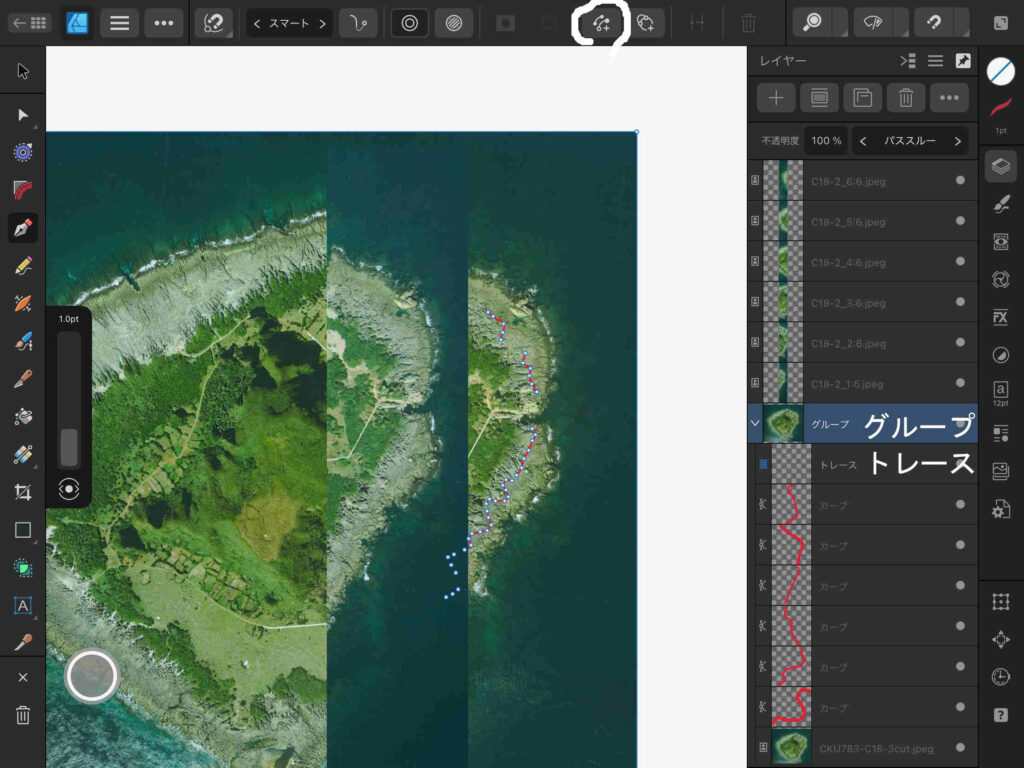
ぼくは,空中写真「CKU783-C18-3cut」レイヤーの上に「トレース」というベクトルが入るレイヤーを作成して,その下に,ペンツール > コンテキスト欄のスマート,を選択して,(試しに)旧汀線をドローしてきたのである。図4〜6では,トレースというサブレイヤーがグループ化されたサブレイヤーの2番目にあるので,サブレイヤー「トレース」をプッシュして上にドラッグして形を整えた。それが図7である。
図7 グループ化されたサブレイヤー 図7は図4〜6より大きく表示しているので見やすいだろう。ただ他の画像の解像度も同じなので,他の画像もブラウザーで拡大してみることができる。図7では,サブレイヤー「トレース」はグループの最上部にあるが,事実上は不要かもしれない。レイヤーまたはサブレイヤーの右端には灰色の○が見える。最下部の写真の右手の○を押すと,表示されなくなるので,白紙的役割は不要かもしれないのである。
グループレイヤーの下位のサブレイヤーには「トレース」を除くと,赤い曲線が並んでいる。個々のサブレイヤーに分割されているのは,線引きの作業を中断しているからである。作業を中断するたびに新たにレイヤーが作成されるのであるが,図7の上端のアイコンのうち,白丸で囲んでいる受話器を二つ並べたようなアイコンは,「選択範囲を保持」というものである。これを押さないで,線引きの作業を中断しつつ,進めてゆくと,レイヤーが別々に分割されてゆく。これを押しておくと,サブレイヤーに分かれてはいるが,繋ぐと,一つのレイヤーに合体されるのである。面的広がりを表現するために色塗りを実施する場合に便利かもしれない。旧汀線は厳密には,連続的にトレースすることはできず,不連続になるのが当然ではある。
図7をよく観察すると,レイヤー「グループ」が選択されているために,赤いカーブ上では,ノード(タップ点)が⚪️になっており,空中写真「CKU783-C18-3cut」の右上隅には⚪️が見えている。
以上,〇時過ぎ,2025年7月7日。
3. ズレを防止して判読作業
このように見てきて,ズレの防止法を知ることができた。ここでは空中写真実体視の観点で,手順を説明する。
a. 手は右利きか左利きか
関心のある隣接する空中写真を二つ選択する。効き目ではなく,手の右利きというような意味で,ぼくは右目を主にものを見ているようである。
裸眼で遠くを見て,左右の目の視野を塞ぐと,ぼくの場合,右目の視野を塞ぐと,よく見える。空中写真の判読の場合もそうだ。空中写真を並べて,左右の特定の位置に指先を置いてみると,左の空中写真の指がよく見える。
目は左利きである。視力は学校時代は1.2,中年になって,1.5〜2.0になった。今は0.9ぐらいか。乱視が出てきたためである。
空中写真判読では手は右利きなので,左右に並べた空中写真のうち,右の空中写真上に判読結果をドローしてゆくことになる。それをトレース trace と表現したい。traceの第1義は,「人や動物の跡をたどること。追跡。」である。この意味でトレースを使う。
ぼくの場合は手が右利きなので,右の空中写真にトレース作業を実施する。左利きの方は,左の空中写真が基図になるので,今後のぼくの記述を読み替えてほしい。
b. 空中写真の準備
これまで,実体視の観点から,空中写真の関心部分を切り取って使ってきた。方針を変えようと思う。
基図になる右に配置する空中写真は全体画像を利用する。空中写真は中心投影画像であり,オルソ(正射)変換して,オルソ画像に変換する必要がある。その場合,空中写真の航空機撮影情報が必要で,市販されている(無料公開されている)空中写真の全体ポジ画像が必要になる。オルソ化はかつてGrassGISを使って何回か実施してきたが思い出しつつ,GrassGISを操作する憂鬱はあるのであるが。
ぼくの場合,右に配置する写真は写真全体を使う。左の写真はこれまで同様である。つまり,必要部分を切り取って,この小宝島の場合は,境界部をダブらせて,6分割するのである。
4.ズレの防止をしつつ
この章がこの投稿の核心部分である。新たなファイルを作成するところから始める。
a. 空中写真の取り込み
新規ドキュメントを作成する。Affinity Designer 2 では,ドキュメントの範囲内しか見えないので,完成版はA4で足りるのであるが,A3横にする。使用する空中写真の解像度は400dpiなので,そのように設定する。
白紙の画面が表示される。図3にみえる上端のコンテクストツールの横3本の「ドキュメント」アイコンを選択し,配置,を選択し,ファイルから配置,を選択して,CKU783-C18-3の空中写真を選択して,開く,をタップし,白紙の画面のうちで,配置する場所にタップすると,この画像が配置される。
この白紙の画面を2本指で縮めて,この写真をA3用紙にずらせると,右三分の二を占めてしまう。
次に,左に配置するCKU783-C18-2の6スリップを順次配置する。この手順は見事によくできている。なお,レイヤーとしては,配置した順に,上方に配置される。右端のレイヤーアイコンをタップして,配列を確認すること。配置が不適切の場合に,ドラッグして配置順を揃えてゆく。
そして,トレース用のレイヤーを右写真の上にのせるのであるが,レイヤーを表示していると上段にアイコンが5個見えて,左端の➕アイコンをタップして,ベクトルレイヤーを追加する。最上部に配置される。
これをドラッグして,最下部に配置されているCKU783-C18-3の空中写真の上に配置する。
次に,このレイヤーとCKU783-C18-3の空中写真を選ぶ。複数のレイヤーを選ぶには,レイヤー上で右にスライドする。そして,上の5個のアイコンの4番目のフォルダ様のアイコンを選択して,グループを選ぶ。これで写真の左手に「>」マークが現れて,ベクトルレイヤーは見えなくなる。「>」マークをタップすると,「∨」に変化して,ベクトルレイヤーが現れる。自動で「レイヤー1」とされているので,5個のアイコンのうちの右端のアイコン「⋯」を選択して,「レイヤー1」を選択すると名称を変更できる。
これまでの結果を図8に示す。
図8 新たに空中写真画像を取り込んでファイルを作成 上縁左端の◻︎が9個からなるアイコン(ペルソナの左側)をタップするとファイルが並ぶトップページに行く。図8の画面が左上隅にみえる。「名称未設定[M]」とある。この画面上右手の三本アイコンを押してファイル名を「小宝島地形分類図4」とする。
b. トレース作業1
作業中に下図(右手の空中写真)とベクトルカーブがズレる現象は,図8のトレースサブレイヤーを選んで作業していた結果ではないだろうか。
グループレイヤーを選択することにした。
なお,作業しているA3書類のオブジェクトを拡大縮小するのは,二本指で広げたり閉じたりすればよい。何らかの作業を失敗した場合,二本指で二回タップ すればよい。
さて,左用の写真のスリップC18-2_1:6を,右写真に移動する場合,作業画面上のスリップをタップすると選ばれるので,これをドラッグして右の空中写真上に移動すれば良いのであるが,実体視が適当な位置の載せるのは無理がある。
そこで,レイヤー表示上でグループレイヤーを選択して,適宜拡大する。そして,またスリップを移動する。
これを繰り返すことで,作業中のベクトルオブジェクトと基図がずれることがなくなるのである。
で,左端のペンツールを選んで,上端のコンテクストメニュで,スマートを選択する。受話器を2個並べたような「選択範囲を保持」と◎アイコン(線を使用)を選択して,右端最上部の○アイコン(カラー)を選んで線の色を指定する。
c. トレース作業2
トレースが一段落したら移動ツールを押すと,この作業は終了する。そしてレイヤーを出してグループレイヤーを選ぶと,先ほど作業したベクトルが「カーブ」として,グループの一つ上のレイヤーとして保存されているのがわかる。
デフォルトは線幅は0.2 ptで,ぼくには細すぎるので,右端のツールのカラーのすぐ下のストロークアイコンを押して,希望する線幅を1.0 ptとした。
そして,「カーブ」レイヤーを下のグループを構成するトレースサブレイヤーの下に移動すると,「カーブ」レイヤーが,トレースサブレイヤーのサブレイヤーとして配置された。
で,すでに設定したように,また,グループレイヤーを選んで,前例のように,ペンツールでドローしてゆくのである。
一応,これで最初のスリップを使った作業は図9のように完了した。
図9 トレース作業2完了 図9では,スリップはC18-2_3:6.jpegを載せており,実体視作業の前である。言い換えると,C18-2_1:6.jpegとC18-2_2:6.jpegは完了した結果を示している。小宝島中央の竹山の右(東)麓には,南風原面と山麓堆積物の境界線(数珠様の白丸の並び)が見える。右側のレイヤーパネルでは,グループレイヤーの下位のベクトルのカーブは2枚のサブレイヤーからなるように見える。海岸に近い方の赤色のカーブは「受話器を2個並べたような『選択範囲を保持』」をONにしていたのでレイヤーが独立せず,グループレイヤーのすぐ下のトレースサブレイヤーにまとまっているのである。竹山の麓のカーブはONにしなかったので,独立しているのである。ぼくは他のセッティングはしていないが,Affinity Designer 2がそう判断してレイヤーパネルを構成しているのである。
d. 特にノードツールについて
ペンツールでカーブの作成を終了するにはバージョン1では,☑️アイコンが用意されていたようであるが?,ヴァージョン2ではない。その代わり,終了するノードに対して,そのノードを再度タップするということらしい。これが機能したかどうかは,そのカーブの全部のノードが濃い白い○や◻︎に変化する。
トップページのユーザーインターフェースでみると,「UIを自動的に隠す」が選択されている。これを解除した。この効果はわからない。「ステータスバーを表示」をアクティブにすると,操作している環境でのヘルプ情報が最下部に現れる。これは初心者には役に立つのではと思う。
図3に示した左端のツール群の上から2番目の「白い▶︎」である。
注記: 作業中,Undo(戻る)とRedo(やり直し)ボタンを使用すると便利である。まずは,設定 > ユーザーインターフェース,でこの機能をアクティブにすると,右端のツール群の最下部の「?」アイコンと時計アイコン(ヒストリーパネル,履歴 history)の間に,「<」(Undo)と「>」(Redo)アイコンが現れる。
e. レイヤーパネルの操作
カーブをどんどん追加してゆくと,整理がつかなくなるし,面倒にもなる。何らかの基準があるのではないかと思われるのである。
以上,2025年7月10日。
Affinity Designer 2のヘルプページ
おわりに
これで終わるのもどうかと思われるかもしれないが,どうもぼくはマスターしたようだ。何か誤解があれば,また,コンテンツを追加するつもりである。
以上,於スタバ,午後8時,2025年7月7日。「d. 特にノードについて」追記:2025年7月8日。
 当社最強の検索機能Pro Searchへの完全アクセス
 文書や画像の無制限アップロードおよび検索
  高度AIモデルの選択:Deepseek R1、OpenAI o3-mini、Claude 3.7 Sonnet、Sonar他
 Deep Researchで、複雑なトピックの詳細分析を数分で探索